Let anyone see what you are selling
Open your profile so people who do not have a Waegook account can still see your listings. Useful when you share your link on WhatsApp, Facebook or KakaoTalk. Your profile stays out of Google search either way.
-
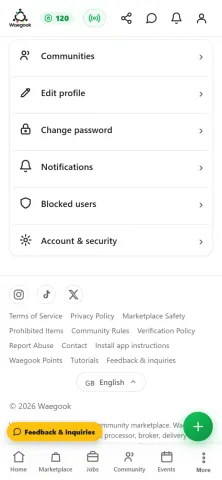
Step 1Open Waegook and go to your Profile page. Scroll down and tap "Account & security".
-
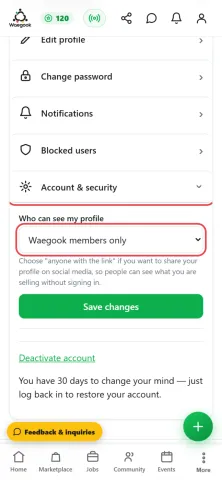
Step 2Look for "Who can see my profile". It starts on "Waegook members only": which means someone without a Waegook account cannot open your page.
-
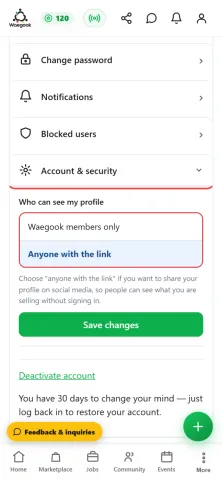
Step 3Tap it and choose "Anyone with the link".
-
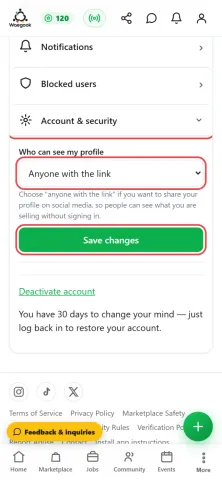
Step 4Tap "Save changes".
-
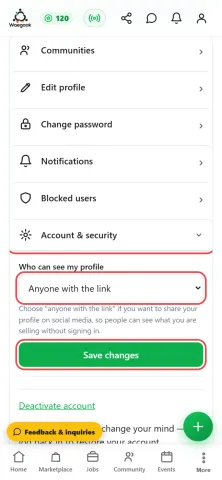
Step 5Saved. Your profile is now open to anyone you send the link to.
-
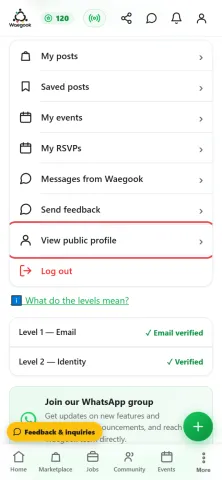
Step 6To get your link, tap "View public profile" and copy the address from your browser. It looks like waegook.com/user?u=YourName
-
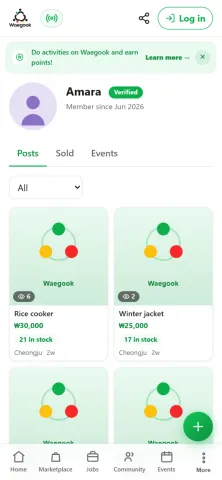
Step 7This is what a visitor sees without logging in: your name, your photo and everything you are selling. Share that link on WhatsApp, Facebook or KakaoTalk so buyers can find you.